How to Run Google Ads: A Complete Guide
Running Google ads takes a Google Ads account, the right campaign type, keywords, bids and budget, ad copy and conversion tracking. A step-by-step guide to pricing logic, Quality Score and setup.
 Sefa AşkınSocial Media Specialist17 min read
In Brief
To run Google ads, you open a Google Ads account, choose the campaign type that fits your goal, prepare keywords and ad copy that match searches, set a budget and bids, set up conversion tracking, and launch the ad. Ads mostly work on a pay-per-click basis; cost varies with competition, Quality Score and industry.
- Google ads let you appear the moment people search for a product or service, which makes them a channel close to the sale.
- For success, keyword selection, ad copy, the landing page and conversion tracking have to be built together; simply raising the budget doesn’t improve results.
- Starting with a small budget and improving keywords, copy and bids based on data is how you keep spending under control.
Table of Contents
When someone types “dentist near me,” “office chair prices” or “get a website built” on their phone, they know exactly what they are looking for. This is where the value of Google ads lies: appearing at the top of the results the moment a customer expresses a need. That is why knowing how to run Google ads matters.
In this article we walk through running Google ads step by step: what Google Ads is, campaign types, account setup, keyword selection and match types, ad copy and the landing page, bids and budget, Quality Score, conversion tracking, pricing logic, optimization, and common mistakes. The interface and options can change over time, so compare the steps with the current screens.
What is Google advertising (Google Ads)?
Google Ads is Google’s advertising platform. Through it, businesses can run ads in search results, on YouTube, in Gmail, and on Google’s partner sites and apps. Most ad models are based on pay per click (CPC): Your ad is shown, but you pay only when someone clicks. In some campaigns, pricing is based on impressions (CPM) or video views (CPV).
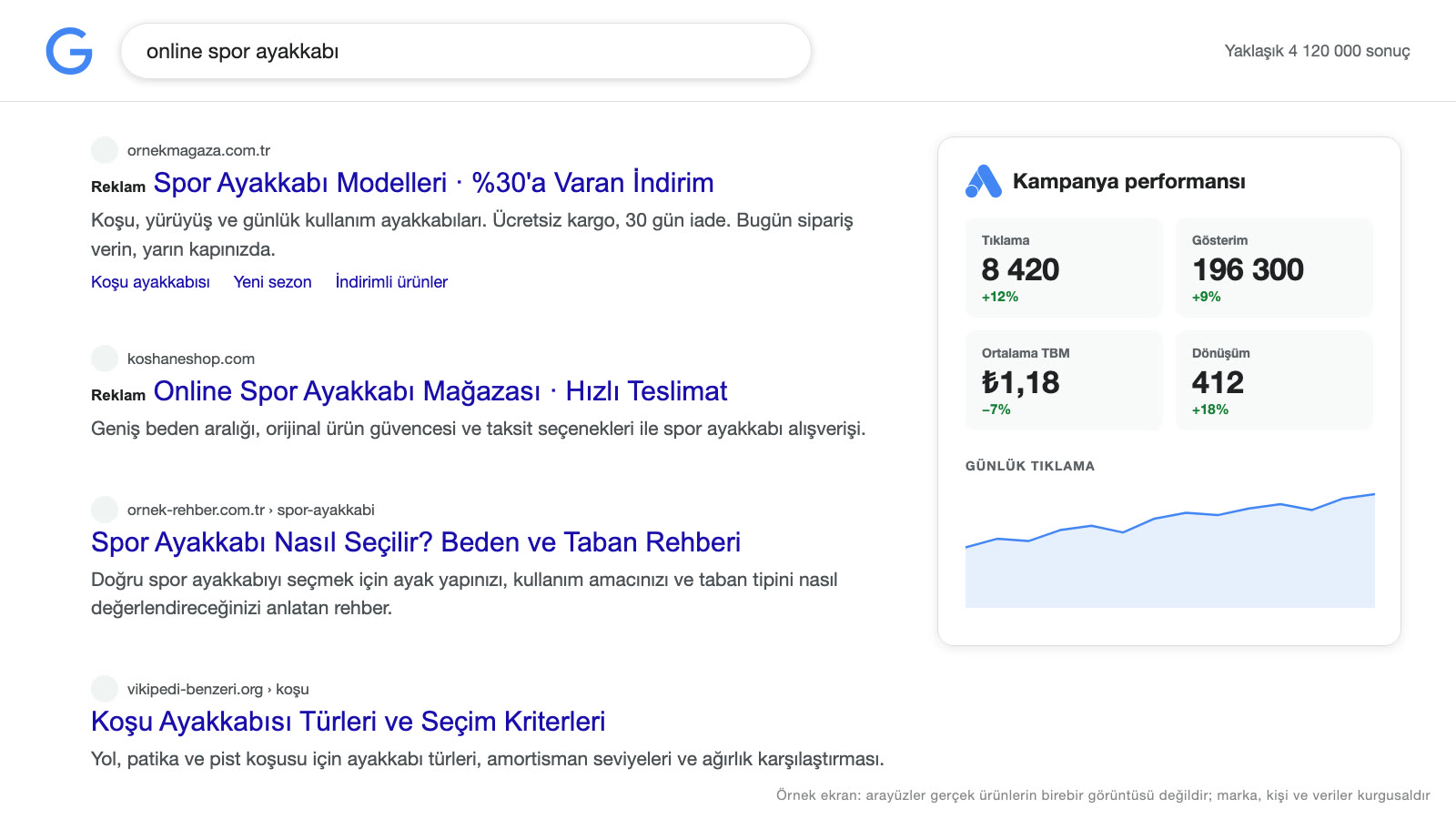
The core logic of search ads is “ads by intent”: When a user searches for something, relevant ads appear above the results with a “Sponsored” label. The difference from social media ads is that instead of catching users by interest, search ads find them by what they are searching for right now. We covered the place of Google ads in the overall marketing picture in our digital marketing guide; this article focuses more on the implementation steps.
Why run Google ads?
- Showing up by intent: The person searching expresses a need and looks for a solution.
- Fast visibility: Delivers visibility faster than SEO; the ad goes live once it passes review.
- Control and flexibility: You can adjust by budget, schedule, region and device, and pause whenever you want.
- Measurability: Results such as clicks, calls, forms and sales are tracked; you see what each keyword brings.
- Local targeting: Ads can be shown only to people in a specific city or area.
- Starting with a small budget: You can test with a low daily budget and scale up.
Ads also have a limit: When the budget runs out or the campaign stops, visibility ends. That is why it’s a good strategy to plan ads alongside long-term SEO work.
Google Ads campaign types
Choosing the campaign type that fits your goal is one of the most important setup decisions. The main types are:
- Search campaigns: Appear in Google search results with text ads. This is the core campaign type for catching customers with search intent.
- Shopping campaigns: Shown in search results and the Shopping tab with product image, price and store information; strong for e-commerce businesses that sell products, and they require a product catalog (Merchant Center).
- Display Network campaigns: Visual ads on news sites, blogs and apps; used for awareness and remarketing.
- Video (YouTube) campaigns: Run before or during video content on YouTube, or among recommendations; suited to brand awareness and interest.
- Performance Max campaigns: An AI-powered, goal-oriented type that serves ads across all of Google’s channels (search, YouTube, display, Gmail, maps and more) from a single campaign. You give the system creative assets (images, video, text) and clear conversion goals.
- App campaigns: Aimed at increasing mobile app installs.
- Demand Gen campaigns: Campaigns aimed at creating demand in visually driven placements such as YouTube, Discover, Gmail and the Display Network.
For a business just starting out, a search campaign is usually the most controlled and instructive start. If you sell products, add a shopping campaign too. The names and features of these types may change over time; check the current options on the Google Ads help pages.
How do you open a Google Ads account?
- Prepare a Google account: Choose a Google account to use for business; if possible, prefer a business-owned account separate from your personal one.
- Sign in to Google Ads: Go to the advertising platform’s site and follow the account creation steps. The system may ask for your goal and try to suggest a “smart” setup; if you want detailed control, switch to Expert Mode.
- Enter business details: Select the business name, website, country, time zone and currency. The time zone and currency are set permanently when the account is created and cannot be changed later (Google Ads Help); choose carefully.
- Set up billing: Add billing details and a payment method. Some new accounts may have promotional credit offers; read the terms and eligibility conditions on Google’s current pages.
- Plan conversion tracking: Before running ads, decide which action on the site you will count as success (a form, a phone call, a purchase).
Keep access and permissions for the people managing your ads under control through the manager account. If you work with an agency, the account owner should ideally be the business, with admin access given to the agency. That way, even if the agency changes, you keep ownership of your account data.
Keyword research
Keywords are the foundation of search ads. Choosing the right keywords means spending your budget on the right people. For research, follow this approach:
- Start from the customer’s language: What words do people use to search for your product? What matters is the phrases they use, not technical terms.
- Separate search intent: Informational searches like “what is” or “how to” have a different value from searches close to buying like “price,” “buy,” “near me” or “get done.” Ad budget mostly goes to the second group.
- Create main groups and subgroups: Group keywords by topic; prepare a separate ad group and copy for each group.
- Use the tools: Google Ads Keyword Planner shows estimated search volume and cost range. Search suggestions and “People also ask” sections also give ideas.
- Study competitors: Which ads show up for the same searches, and which messages stand out?
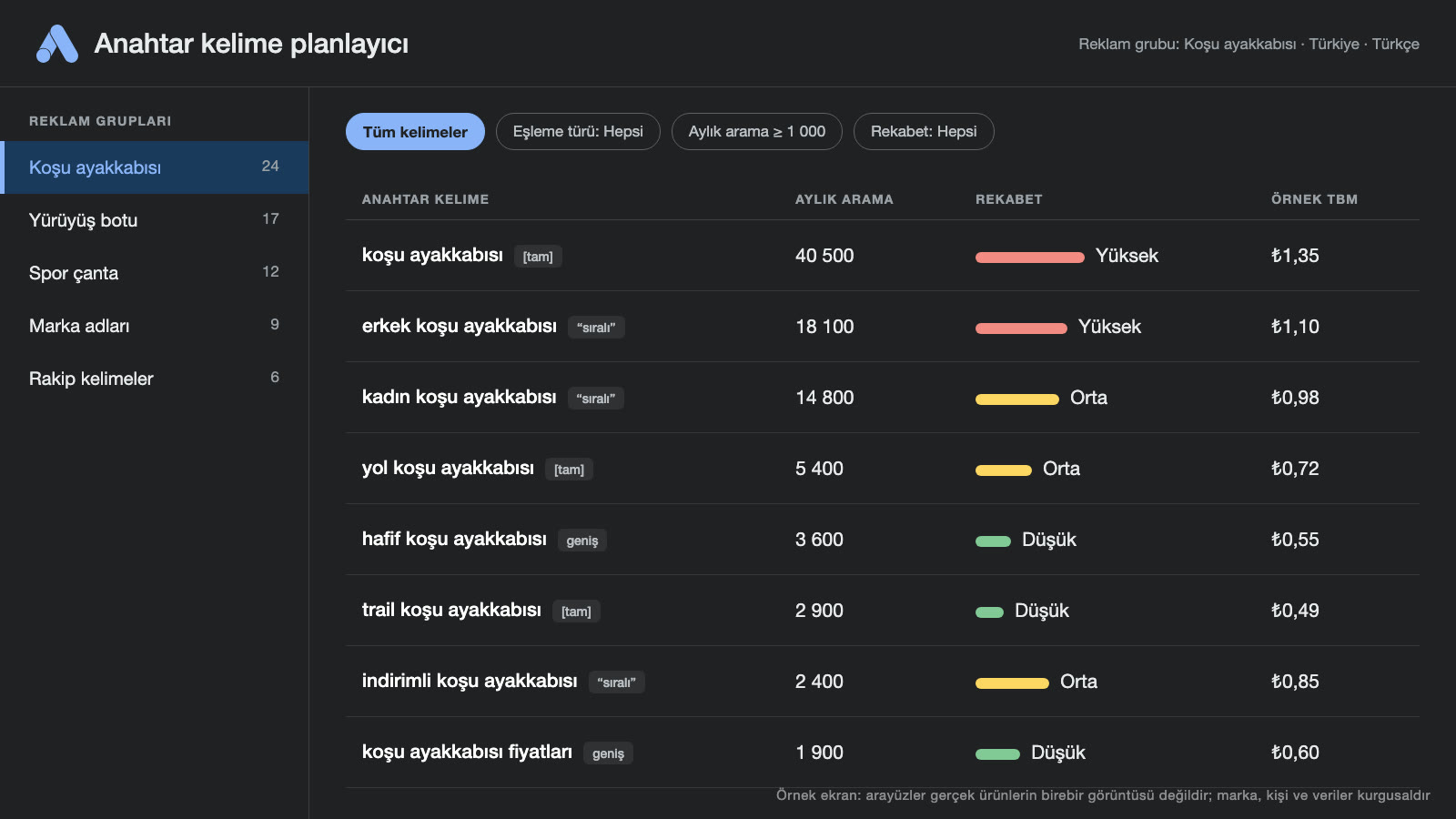
Keyword match types
The match type determines the searches for which a keyword will trigger your ad:
- Broad match: The ad is shown on a very wide range of searches related to the keyword; reach is high, and so is the risk of matching irrelevant searches.
- Phrase match: Shown on searches that include the meaning of the phrase; balanced between reach and control.
- Exact match: Shown on searches that carry the exact meaning of the keyword; gives the most control, with lower reach.
Because Google updates from time to time how match types work and how they relate to automated bidding strategies, check the official help pages. Google recommends broad match together with automated bidding strategies; new accounts that want more control can start with phrase and exact match.
Negative keywords
Negative keywords determine which searches your ad will not be shown on. For example, if you sell a high-priced service, adding words like “free,” “no cost,” “job listing” or “internship” as negatives prevents irrelevant clicks. Regularly reviewing the search terms report and adding new negative keywords is a useful habit for budget efficiency.
How do you write ad copy?
Search ads consist of short headlines and descriptions. In most campaigns you enter multiple headlines and descriptions, and the system tests them in different combinations. In a responsive search ad, you can enter up to 15 headlines (30 characters each) and 4 descriptions (90 characters each) (Google Ads Help). For effective copy:
- Match the search: Include the phrase the user searched for in the headline.
- State the benefit: Describe the outcome the customer gains, not the feature.
- Highlight what sets you apart: Real advantages such as speed, price, warranty, experience or a free site visit.
- Add a call to action: “Get a quote,” “Call now,” “Free consultation.”
- Use extensions: Ad extensions such as sitelinks, call, location, callout and price (now called “assets” in Google Ads) expand the ad and can raise click-through rate.
- Be accurate and measured: Exaggerated or misleading promises both violate policy and cost you trust.
When writing copy, briefly reflect the promise in your brand positioning. You can generate copy alternatives with AI tools; still, review the wording you use for accuracy and brand voice.
Article 25/A, added to the regulation by the Regulation Amending the Regulation on Commercial Advertising and Unfair Commercial Practices (Official Gazette, July 1, 2026, no. 33297; in force August 1, 2026), regulates targeted advertising. When sellers and providers, or intermediary service providers that facilitate distance contracts on their behalf, serve ads tailored to specific people or groups by analyzing consumers’ online behavior, records of past preferences, location data, demographic data or similar personal data, this is treated as targeted advertising. This kind of advertising is allowed provided that consumers are given direct and easily accessible information on the criteria by which the ad is shown to them and how those criteria can be changed. Where the consumer is known, or reasonably expected to be known, to be a child, targeted advertising using profiling methods based on personal data is not permitted. Keep this provision in mind when using targeting options such as audience, demographics and location in Google Ads. For the exact text, see the Official Gazette page at the link.
Landing page: The real test of an ad
The ad brings the click; the landing page delivers the conversion. A bad page wastes a good ad, because you pay per click but the customer leaves the page. A good landing page ensures that:
- The promise in the ad and the headline on the page are consistent.
- The page loads fast on mobile and reads comfortably.
- There is one clear call to action (form, call, purchase).
- Trust elements (reviews, client references, certificates, contact details) are visible.
- Unnecessary menus and distracting links are reduced.
For details, see our landing page guide, and for overall site quality, our corporate website article.
What determines the cost of Google ads? Bids and budget
The answer to searches like “Google ads prices” and “cost of running Google ads” is not a single figure but a mechanism. Google ads work through an auction system: When someone searches, the system determines which of the ads matching that search are shown, and in what order. The bid you submit is not the only thing that decides the ranking. According to Google, Ad Rank rests on six factors: the bid, ad and landing page quality, Ad Rank thresholds, competition in the auction, the context of the search, and the expected impact of ad assets (extensions) (Google Ads Help). That is why the highest bidder doesn’t always show up at the top; a high-quality ad can win a better position at a lower cost.
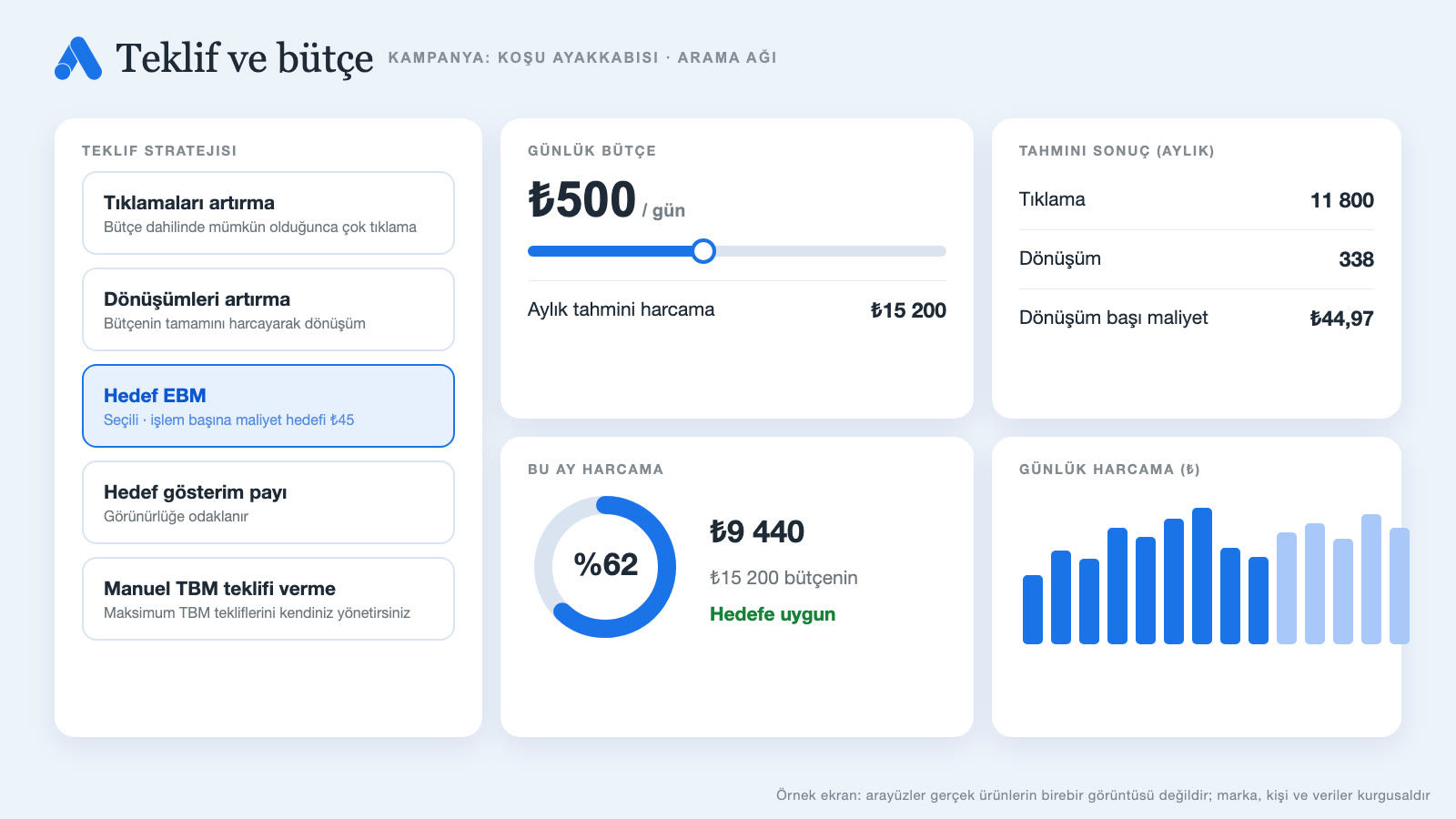
Bidding strategies
- Manual cost per click (Manual CPC): You set the bid for each keyword; control is high, but it takes attention and time.
- Automated strategies: The system adjusts bids automatically based on your goal. Options include Maximize clicks, Maximize conversions, Target CPA (cost per conversion) or Target ROAS (return on ad spend). Automated strategies work better when there is enough conversion data.
Setting a budget
To set a budget, follow this order:
- Calculate the allowable cost per customer: What is the most you can spend to win one customer?
- Estimate the conversion rate: Assume what percentage of visitors will request a quote or buy (this is a guess at first; it is updated with data later).
- Check the cost per click: The estimated costs in Keyword Planner give an idea.
- Set the daily budget: Work out the required daily budget from the target number of conversions, cost per click and conversion rate.
- Start small, then scale: Collect data with a test budget and gradually raise the budget for what performs well.
The daily budget is an average: On a high-traffic day, Google may spend up to twice the average daily budget, but total spend in a month will not exceed 30.4 times the daily budget (Google Ads Help). If your budget is very low, your ad may use it up early in the day and not show during the remaining hours; in that case, focus on fewer but higher-intent keywords. For how ad budget relates to the overall marketing budget, take a look at the marketing strategy guide.
What is Quality Score?
Quality Score is Google’s estimate of how relevant and useful your ad, keyword and landing page are to the user. The score is shown at the keyword level on a scale of 1–10 and is calculated from three components: expected click-through rate, ad relevance and landing page experience (Google Ads Help). According to Google, Quality Score is a diagnostic tool and not a direct input to the ad auction; ad and landing page quality affect ranking. To improve the components behind the score:
- Split keywords into themed groups; write relevant copy for each group.
- Include the searched phrase in ad headlines.
- Make the landing page consistent with the ad message and fast.
- Use ad extensions.
- Clean out low-performing keywords and ads.
Conversion tracking
Without measurement, Google advertising is shooting in the dark. Conversion tracking records the valuable actions that happen after an ad click (filling in a form, a phone call, a purchase, a message). With this data you can see which keyword, which ad and which campaign deliver results. Tracking can be set up with the Google tag, a web analytics integration or tag management tools. Test after setup: Fill in a form on the site yourself and make sure the conversion appears in the report.
Conversion data is also the fuel for automated bidding strategies; wrong or incomplete tracking makes the system learn the wrong thing. If you also want to measure phone calls, consider adding a phone number to your ad and measuring the calls you receive. For the general approach to measurement, see the measurement section of our digital marketing guide.
Setting up a search campaign step by step
- Choose the goal: Sales, leads or website traffic.
- Choose the campaign type: Start with a search campaign.
- Set network and location options: Define the locations where the ad will appear (country, city, radius) and the language. If you don’t want the Display Network, keep the Search Network option separate from it.
- Set the budget and bidding strategy: Enter the daily budget and a starting bidding strategy.
- Add ad groups and keywords: Group by topic, choose match types and add negative keywords.
- Write the ads: Enter multiple headlines and descriptions for each group and define the landing page.
- Add extensions: Sitelinks, call, location, callout.
- Verify tracking: Test that conversions are being recorded.
- Launch and monitor: After policy review, the ad goes live; closely watch search terms and spend in the first few days.
Optimization: What to do after launch
An ad campaign is not a “set it and forget it” job. Regular optimization lowers cost and improves results. Include these in your weekly and monthly routine:
- Search terms report: See which searches you matched; add the irrelevant ones as negative keywords and add the ones that work well separately as exact match.
- Keyword and ad performance: Pause keywords that have enough data but bring no conversions.
- Ad tests: Test different headlines and descriptions; keep the winner.
- Device, time and location settings: Look at which device, time of day and region give better results and adjust bids.
- Landing page improvements: Test changes that can raise the conversion rate.
- Budget allocation: Allocate budget to the campaigns that deliver the best results.
Be patient with optimization: Small and very frequent changes can disrupt the system’s learning process. Decide after enough data has built up (especially with automated strategies).
Google ads for local businesses
For businesses serving a particular city or district, Google ads mean being visible only to people in the area. Set location targeting to the district or a specific radius; add searches like “near me” and “city name + service” to the keyword list. Add location and call extensions to the ad so mobile users can call with one tap. Alongside the ad, keeping your business profile current and filled with reviews and photos builds trust and increases visibility in map results.
To avoid missing calls outside business hours, you can set the ad schedule to the business’s working hours or offer alternative conversion paths such as forms and messages. If your budget is small, every click counts, so keep the negative keyword list broad from the start.
Automation and AI-powered campaigns
In many campaign types, Google recommends automated bidding and AI-powered placement. Campaigns like Performance Max decide for themselves where to show the ad, using the images, video, headlines and audience signals you provide. The advantage of this approach is broad reach with less manual work; the drawback is limited detail on which search or channel the results came from.
When using automation, follow these principles: Don’t go fully automatic without enough conversion data; define conversion goals correctly (a wrong goal makes the system optimize for the wrong thing); exclude placements and searches that don’t fit your brand and products; compare results against business data (actual sales and customer quality). Automation doesn’t remove management; it only changes the way you manage.
Should you manage it yourself or work with an agency?
Managing ads yourself makes sense for learning and running first tests with a small budget; understanding how the platform works also gives you an advantage when talking to an agency. As budget and competition grow, time constraints increase or conversion goals get more complex, professional support gains value. When choosing an agency, look at the following:
- Make sure you are the owner of the ad account; give the agency admin access, but keep the account in the business’s name.
- Reporting should talk about business results such as conversions, cost per customer and sales, not surface data like clicks and impressions.
- The management fee and the ad budget should be written separately in the proposal.
- Goals, duration and optimization frequency should be clarified in writing.
We explain what agencies do and how to choose one in our advertising agency guide.
How should you read the reports?
The Google Ads screen shows many numbers; don’t give them all equal weight. When reading a report, follow this order:
- Conversions first: How many forms, calls or sales came in, and what is the cost per conversion?
- Then cost per click and click-through rate: Is the ad attracting interest, and what are you paying per click?
- Search terms: Which searches did you actually match?
- Device, time and location breakdowns: Where is performance better?
- Impression share: How much of the opportunity are you capturing? Are you missing out because of budget or rank?
Don’t limit reporting to the platform; cross-check it against your own business data: Did the lead from the ad actually become a customer, and which campaign’s customers are more valuable? Platform data alone doesn’t tell the whole story.
Common mistakes
- Ads without tracking: Spending budget without measuring conversions.
- Broad and irrelevant keywords: Starting with very broad match and no negative keywords.
- A weak landing page: Sending all traffic to the home page, or using a slow page that breaks on mobile.
- Settling for a single ad: Not testing different copy.
- Accepting automated suggestions without question: Not checking whether the system’s recommendations fit the business goal.
- Judging too early or intervening too late: Making decisions without allowing for the learning period, or watching a poorly performing campaign for weeks.
- Spreading the budget thin: Giving small budgets to many campaigns and not collecting enough data in any of them.
- Ignoring policies: Facing ad or account restrictions because of misleading claims or restricted content.
Sample scenario: A kitchen cabinet workshop
A fictional example: A workshop that makes custom-fit kitchen cabinets in a city wants to use Google ads to increase the flow of new customers. Hypothetical goal: get 25 site-visit appointment requests a month.
Preparation: The website is made mobile-friendly, and a landing page with a “free site visit and measurement” offer and a short form are prepared. Form submissions and phone calls are tracked as conversions.
Campaign: A single search campaign is set up for only the chosen city and its surroundings. Keyword groups: “custom kitchen cabinet,” “get kitchen cabinets made,” “kitchen cabinet prices” and “kitchen cabinet maker.” Negative keywords: “second hand,” “job listing,” “ready-made,” “diy.” Ad copy: “Free site visit and measurement,” “Made in our own workshop,” “Delivered with installation.” Extensions: call, location and sitelinks.
Budget and monitoring: Start with the calculated daily budget. For the first two weeks, search terms are reviewed every day; irrelevant searches are added to the negative list. Suppose that in the second week the “price”-focused keywords turn out to have low form conversion and the “get made” and “maker” keywords high; in that case the budget is shifted to those keywords.
Possible outcome (hypothetical): The aim is to track and bring down the cost per site-visit request; the questions customers ask can also be learned from the ad data and added to the FAQ section on the website.
This fictional example is meant to show how a clear offer, conversion tracking, negative keyword discipline and data-driven budget shifts work together; it is not a real result.
Google ads checklist
- Have the ad’s goal and success measure (form, call, purchase) been written down?
- Was the Google Ads account opened with the correct time zone and currency?
- Has conversion tracking been set up and tested?
- Was the campaign type chosen to fit the goal?
- Were keywords grouped by intent and match types defined?
- Has a negative keyword list been prepared?
- Have multiple headlines and descriptions been written for each ad group?
- Have ad extensions been added?
- Is the landing page fast, mobile-friendly and consistent with the ad?
- Were the daily budget and bidding strategy calculated from the goal?
- Has a weekly check of the search terms report been put on the calendar?
If you want to manage Google ads together with strategy, landing pages and reporting, take a look at our digital advertising services. To strengthen the local search side of advertising, you can also read our Google Business Profile guide, and for social media ads, our Instagram advertising guide.
Mini glossary: Google Ads terms
- CPC: Cost per click.
- CTR: Click-through rate; the percentage of impressions that get a click.
- Quality Score: An estimate of the relevance and quality of the ad, keyword and page.
- Keyword: The search phrase that triggers the ad.
- Negative keyword: A search phrase you don’t want your ad shown for.
- Match type: The setting that determines which searches a keyword will match.
- Ad extension: A field that adds extra information to the ad (call, location, sitelink and so on); now called an “asset” in Google Ads.
- Conversion: A valuable action that happens after an ad click.
- ROAS: Return on ad spend.
- Performance Max: An automated, goal-driven campaign type that runs across all of Google’s channels.
Frequently asked questions
How do you run Google ads?
You open a Google Ads account, choose the campaign type that fits your goal, prepare keywords and ad copy, set the budget and bids, set up conversion tracking, and launch the ad. After launch, search terms and performance are monitored and improved regularly.
How much do Google ads cost?
There is no fixed price. Cost varies with industry, competition, keyword, ad quality and targeting. Ads mostly work on a pay-per-click basis; you set the daily budget yourself and can pause at any time.
What do you need to run Google ads?
You need a Google account, a Google Ads account, a payment method, a clear goal, keywords, ad copy, a working landing page and conversion tracking. If you sell products, you also need a product catalog for shopping ads.
Which campaign type should I start with?
For most businesses, a search campaign is the most controlled start. If you sell products, consider a shopping campaign; if you aim for awareness, video or display campaigns; if you want conversion-focused broad reach, Performance Max.
What is Quality Score for?
Quality Score is a diagnostic indicator of how relevant your ad, keyword and landing page are. According to Google, the score is not a direct ranking factor; components that score low point to opportunities to improve the ad and landing page.
What is the difference between Google ads and SEO?
Ads are paid and fast; when the budget runs out, so does the visibility. SEO aims for free (organic) rankings, and its results take time but last. Using both together is the healthiest approach for most businesses.
Conclusion
Google ads are one way to appear in front of customers the moment they search for what they need. Choosing the right campaign type, grouping keywords by intent, applying negative keyword discipline, preparing persuasive copy and a strong landing page, measuring conversions, and optimizing regularly make sure the budget is used efficiently. Start with a small budget, listen to the data and grow what works; manage advertising not as an expense but as an investment that is measured and learned from.
This article was prepared with AI support. The images in the article are sample screens drawn with code; they don’t show a real client, person, place or data.
Related work
A few examples of Media Fish’s work on this topic:


E-Commerce Site + SEO + SEM
Design · Software · Publishing
Social Media Specialist, Media Fish. Writes on our blog about social media management, digital advertising, branding and content production.